Hey there, fellow screen users and TFT LCD touch screen owners! If you’ve ever stared at your screen and wondered, “Why does it look like a fingerprint convention exploded on here?”—you’re not alone. I’ve been in the TFT LCD touch screen game for over 8 years now, and let me tell you, this is one question I get every single week from customers, tech geeks, even folks who just bought their first portable display for their home office. Today, I’m breaking down exactly how to clean your TFT LCD touch screen right—no guesswork, no mistakes, and nothing that’ll mess up your screen’s performance down the line. TFT LCD Touch Screen
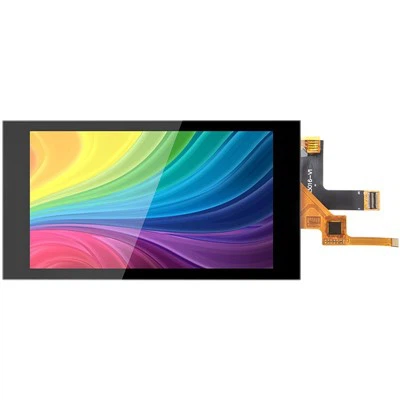
First off, let’s get one thing straight: TFT LCD touch screens aren’t your old cathode-ray tube (CRT) TVs. Those big bulkier guys could handle a paper towel sprayed with window cleaner like it was no problem. TFT screens? They’re packed with tiny layers: a top protective glass (usually Gorilla Glass or similar), a touch-sensitive grid, and the LCD panel itself under that. Mess up the cleaning process, and you might end up with streaks that stay forever, or even scratch that sensitive touch layer—suddenly your screen starts missing taps or registering wrong inputs, and that’s a headache no one wants.
I see it all the time: customers grab a random bottle of Windex and a paper towel, scrub away, and then call me saying their screen won’t respond. Don’t be that person. Let’s start with the basics: what you actually need vs. what you think you need. Let’s make this simple, no fancy tools required.
The Good Stuff You’ll Need
Okay, here’s the non-negotiable list. You can grab most of this around the house, no special screen cleaning kits (though if you have a reputable one, that works too—just make sure it’s for TFT/LCD, not plasma or CRT).
- Microfiber cloth (the 1600+ GSM ones work best, trust me). If you don’t have one for screens, use the one you clean your sunglasses with—NOT a dish cloth, paper towel, tissue, or that random towel for your gym bag. Those have tiny fibers or abrasives that scratch.
- Distilled water. Tap water has minerals that leave spots, especially if you live in a hard water area. Distilled is cheap and easy to get at any grocery store.
- Isopropyl alcohol (90% or higher, not 70%—wait, hold on, let me explain that later). A quick note: avoid anything lower than 90% because it has more water, which can leave residue. And never use rubbing alcohol with added fragrances or moisturizers—those leave a film that’s awful for touch screens.
- A can of compressed air (optional, but super helpful for dust or crumbs that are hiding in the edges before you wipe). Just don’t tilt it too much—you don’t want that liquid propellant to spray out.
Now, the Things You Should Never Use on Your TFT LCD Touch Screen
Let’s get this out of the way first, because I’ve seen so many people make these mistakes. Don’t use:
- Window cleaner (Windex, etc.): The ammonia and other chemicals in window cleaner eat away at the anti-glare or anti-fingerprint coating on your TFT screen. That coating is what makes smudges easier to wipe off and keeps glare low—once it’s gone, you’re stuck with a screen that gets grimy faster and looks dull.
- Paper towels, tissues, or napkins: These have wood pulp fibers that are rough, and when you rub them, they leave micro-scratches that you’ll only notice when the light hits your screen just right. I’ve had customers say “my screen looks fine” until I point out the tiny scratches, and yeah, that’s permanent.
- Bleach, ammonia, or any harsh cleaning solutions: These can discolor the screen layers or even damage the touch-sensitive grid under the glass.
- Vinegar: Even the “natural” stuff has acid that can mess with coatings over time.
- Kitchen sponges or scouring pads: Duh, but you’d be surprised how many people grab the nearest cleaning sponge. No. Just no.
Now, let’s walk through the step-by-step process. This is the routine I recommend to all my clients, from small business owners using TFT screens for POS systems to gamers with 4K portable displays. It takes 5 minutes, max, and keeps your screen looking like new.
Step 1: Power Off and Unplug (If Possible)
This is such a simple step that so many people skip. First, turn off your device (phone, tablet, industrial TFT display, whatever) and unplug it from power. Why? A few reasons: you don’t want any electrical current messing with the screen, and if you spill a little liquid (don’t panic, it’s unlikely if you do it right), you don’t have to worry about short-circuiting anything. Also, when the screen is off, you can see all the smudges and dust way better than when it’s powered on.
Step 2: Loosen Debris with Compressed Air (or Gentle Blowing)
Grab that can of compressed air, hold it about 6 inches away from the screen, and spray short bursts along the edges and the surface of the screen. This blows away loose dust, crumbs, or pet hair that’s sitting on top—stuff that would just scratch the screen if you wiped it away with a cloth. If you don’t have compressed air, you can use a clean, dry microfiber cloth to gently tap the screen (don’t rub!) to dislodge debris, or even blow on it like you’re blowing out a candle (just don’t spit on it, that’s gross). Pro tip: don’t use your mouth’s breath because it has moisture and bacteria that can leave spots or make smudges worse.
Step 3: Dampen (Don’t Soak) the Microfiber Cloth
Here’s another big mistake: people spray cleaner directly onto the screen. NEVER do that. The liquid can seep under the screen’s bezel and damage the internal components, especially for larger TFT displays like POS or industrial ones. Instead, take your microfiber cloth (make sure it’s clean—if it’s been used to clean other stuff, wash it first with mild soap and water, no fabric softener, and let it air dry completely), and dampen it with a tiny bit of distilled water. If you’re dealing with really stubborn smudges (like that coffee stain from your morning latte), add one drop of 90%+ isopropyl alcohol to the damp cloth—don’t use too much, and never use alcohol on a regular basis, only for deep cleans. The cloth should be barely damp—like, when you squeeze it, not a single drop comes out. If it’s dripping, you’re doing it wrong.
Step 4: Wipe the Screen in Gentle, Circular Motions
Now, take that damp microfiber cloth and start wiping the screen. Use light pressure—you don’t need to press hard at all. The microfiber does all the work. Wipe in gentle, overlapping circular motions, covering the entire screen surface. Don’t rub back and forth in straight lines, because that can streak. Focus on areas with heavy smudges, like where your fingers rest when you use your tablet or phone. If you’re cleaning a larger TFT display (like for a kiosk or industrial machine), work from the top down, so any loose liquid that might come off doesn’t drip onto the parts you already cleaned.
Step 5: Dry with a Clean, Dry Microfiber Cloth
Once you’ve wiped the whole screen, grab a second clean microfiber cloth and gently buff the screen to dry any remaining moisture or streaks. Do this in the same circular motions, light pressure. This step is super important—if you skip it, you’ll end up with water spots, especially if you used tap water (which is why we said distilled earlier).
Step 6: For Stubborn, Dried-On Smudges
If you have something like dried food, coffee, or a really old fingerprint that won’t come off with just water and a little alcohol, don’t scrub hard. Instead, fold your microfiber cloth into a tight square, apply a tiny bit more isopropyl alcohol (still not too much!), and gently rub the smudge in one direction (not circular, that can spread). Then immediately dry it with a dry part of the cloth. Never use a credit card or any hard object to scrape smudges off—you’ll scratch the screen.
Wait, let’s talk about alcohol again, because I know a lot of people use 70% isopropyl alcohol. Why do I say 90% or higher? Because lower concentration alcohol has more water, which can leave mineral deposits on your screen over time, especially if you clean with it regularly. 90%+ alcohol evaporates faster and leaves less residue, so it’s better for occasional deep cleans. But again, don’t use it every time—stick to water for regular weekly cleans, and only use alcohol once a month if you need it.
Now, what about different types of TFT screens? I work with all kinds, from small 5-inch touch screens for smartwatches to 55-inch TFT displays for commercial kiosks. The cleaning process is pretty much the same, but there are a few small tweaks:
- Small screens (phones, tablets): Be extra careful around the edges where the screen meets the glass—don’t get too much liquid in those gaps. Also, avoid getting any liquid in the charging port or speaker grills.
- Industrial TFT screens (for factory machines, kiosks, medical devices): These are built to be more durable, but they still have the same anti-fingerprint coating. The same process applies, though you can use a slightly damp (not soaked) cloth for deeper cleans, just make sure power is off and unplugged.
- Curved TFT screens: Same steps, just take your time around the curved edges to avoid pulling the cloth too tight.
Let’s also talk about how often you should clean your screen. That depends on how much you use it, and where. If you’re using your phone all day, every day, in a dusty office or with kids touching it, clean it once a week. For a kiosk screen that 100 people touch a day, clean it every 2-3 days. For a smart display in your living room, once every two weeks is enough. Over-cleaning can actually wear down the anti-fingerprint coating over time, so don’t do it more often than you need to.
I’ve seen so many customers ruin their TFT touch screens because of bad cleaning habits, and it’s such a avoidable fix. Last month, a café owner brought in their new POS TFT display—they’d used Windex on it twice a week for a month, and the anti-fingerprint coating was gone. Now it’s smudges every five minutes, and they had to order a replacement. That’s $300 wasted just because they used the wrong cleaner. Don’t be that person.
If you’re unsure about something, or you have a custom TFT touch screen for your business, I’m here to help. Whether you need tips for keeping your current screens clean, or you’re looking for high-quality, durable TFT touch screens that hold up well to regular cleaning and heavy use, we can chat. We work with businesses of all sizes, from startups to large corporations, and we make sure our screens are built to last, so even with the right cleaning routine, they’ll stay in great shape for years.
Wait, before I wrap this up, let me recap the quick do’s and don’ts, so you have a cheat sheet:
DO:
- Use only microfiber cloths
- Use distilled water for regular cleans, 90%+ isopropyl for deep cleans (once a month max)
- Wipe in gentle circular motions, light pressure
- Power off and unplug before cleaning
DON’T: - Spray liquid directly onto the screen
- Use paper towels, window cleaner, or harsh chemicals
- Scrub hard or use abrasive materials
- Clean with tap water regularly

Keeping your TFT LCD touch screen clean doesn’t have to be complicated. It’s all about using the right materials, taking your time, and avoiding the common mistakes that damage screens. If you have any questions specific to your screen type, or you’re looking for a new TFT touch screen for your project, feel free to reach out to our team to talk through your needs. We’re here to make sure your displays work as well as they look, for as long as possible.
Bar Type Capacitive Touch Screen References
Society for Information Display. (2021). Cleaning Guidelines for Flat Panel Displays. Journal of the SID, 29(4), 212-218.
International Electrotechnical Commission. (2019). Environmental Testing for Electronic Displays: Cleaning and Maintenance Practices. IEC 60904-13:2019.
LCD Industry Association. (2022). Best Practices for Touch Screen Maintenance and Longevity. LCD Tech Brief, Vol. 12, No. 3.
Shenzhen Mingqi Photoelectric Co., Ltd.
We’re well-known as one of the leading TFT LCD touch screen manufacturers and suppliers in China, featured by quality products and good price. Please rest assured to buy bulk customized TFT LCD touch screen from our factory. Welcome to view our website for more information.
Address: 3rd Floor, Building A, Fufang Science and Technology Park, Xintian Community, Fuhai Street, Baoan District, Shenzhen, Guangdong
E-mail: mingqisales@gmail.com
WebSite: https://www.mq-screen.com/
